
Link building is full of time consuming, repetitive tasks. I’ve written once before about humanistic scaling, which works great as a strategic approach to link building, but ultimately, there will always be a degree of heavy lifting that requires someone to sit down and work through a bunch of repetitive tasks. This includes tasks like advanced searches, prospecting, contact detail discovery, following up with content writers, sending emails, reminding yourself to follow up, and copying information from tool to tool or source to tool with no streamlined workflow.
I’d like to share some useful tools that can help you scale these tasks (some of them I use all the time, others I’ve poke around with at times, and others are just cool and useful when needed).
Quix + Bookmarklets
Bookmarklets are a great way to speed up repetitive and straight-forward tasks by writing them out in JavaScript. Tom and Rand have both shared several examples of SEO bookmarklets on SEOmoz, but a cool tool, put together by Yoast, is Quix.
“Quix is an extensible bookmarklet, that allows you to easily access all your bookmarks and bookmarklets, across all your browsers, while maintaining them in only one spot.”
It has a great set of built in bookmarklets for SEO, webmasters, WordPress, and social, but you can also add your own.
ToutApp + Highrise
If you regularly read my posts, or seen me speak in Boston, you’ve heard me talk about ToutApp. You can see more about it in my Effective Link Building slide deck or listen to me give a webinar about it on SEOmoz. This tool allows you to very quickly find email addresses, send emails inline, and post from a saved set of templates. It then stores metrics on open rates and CTR on your outreach emails, which let you A/B test templates.
They’ve been adding more features as well, so it’s work checking out. It’s also worth noting there have been some concerned voiced by the team over at SEER, but also checkout the response from the owner in the comments.
This last week I discovered that ToutApp integrates with Highrise. There are multiple link building focused CRMs out there, but Tout integration is nice. The humanistic focused approach to link building is one that focuses a lot more on repeat relationships. In this sense, link building needs to start behaving more like PR and sales functions, which rely heavily on CRM style software. As a link builder, you often have a set of “go to” resources, such as a contact at Wired, a blogger on Tumblr, Mashable, or Alltop who you can reach out to when you need promote a particular piece of content. Highrise lets you easily track a conversation thread with a particular person over time and maintain notes about the on-going context of that relationship. It also lets you make reminders for yourself, like “oh, I haven’t seen Ross Hudgens in a while, I should set myself a reminder to ask him out for drinks every 1 to 3 months” or “let me put in a reminder to tell Bob at Mashable happy birthday on his birthday, so I’m not always contacting him when I want something”. Or you can search through historical conversations, so you know that Bob’s kid’s name is Sarah, so you can repeat that to make future emails more personable.
Peepmail
Having a hard time hunting down a tricky email address? There are a lot of ways to find it, including creative searches, whois snooping, or using tools like the Find Contacts on Raven. However, it’s nice to have one more tool in your toolbox. Say hello to Peepmail. Need to know the email address for Edward Wyatt at the NYT? It’s ewyatt[at]nytimes.com. Thanks, Peepmail. Or Justin, the SEO Manager at Big Fish Games? Peepmail says it’s justin [dot] briggs [at] bigfishgames [dot] com (and that’s right, even though I just started and I haven’t listed my email publicly before). It’s not perfect, and seems to not find emails more often than it does, but it’s a quick check when you’re stuck.
Texter
I learned about this tool the first day on the job at Big Fish Games. On your first day there, you spend four hours in customer service getting to rotate through all the forms of CS, including forums, email, live chat, and phone.
I was most intrigued by the creative solutions used by the email support people, because these guys send a lot of repetitive emails, just link builders.
One guy had a system of prewritten responses in individual text files and he’d perform a search against that folder via OS search to quickly find his typed out solutions to a know issue – a fairly genius solution. He also introduced me to Texter, which is a text expander.
Texter works by assigning a blurb of text to a series of keyword shortcuts / commands. In a few simple keystrokes, he was able to paste different text blurbs, including multiple variations of introductions and closings, as well as commonly cited links to resources. For a link builder, this can include using persona based outreach methods and building a variety of premade blurbs, such as common introductions by persona, various link request options, variations in anchor text, and various signatures (especially great if link building for various clients). Toutapp works well for full templates, but Texter adds one more layer of agility in swapping out preformed outreach text snippets. There is another useful article on Lifehacker about how to use text expansion to save hours of typing.
ifttt
I first learned about ifttt on Outspoken Media, but Brian Chappell wrote a nice post about it on Ignite. This service sets up a conditional set of recipes, that when one action is performed, it automatically does another. I hope to sit down soon and work out a bunch of useful recipes for link building. But one quick example is an alternative, but passive, way to finding guest blog posts.
Let’s say I own a zombie site (surprisingly I don’t) and I’ve exhausted all the guest post opportunities I could find via advanced search queries. I do a search on Topsy for [“guest post” zombie], which will show me tweeted guest blog posts about zombies in the last 30 days. These are websites actively accepting and posting guest posts about zombies. The number is 36, and 2 in the last day, so this doesn’t occur all that frequently for this niche. I might not want to do this search regularly, but I can setup a task that if this feed gets a new item, it’s passed to Evernote, or I’m sent an email, or a calendar event is added to follow up to check it. These prospective opportunities can be passively passed to you as they appear.
Boomerang
If you’re using Gmail for your outreach, Boomerang is nice.
What can Boomerang do?
- Set an email to go out in the future at a specific time – Example: I want this email to land in the email box of someone in London at 10 am their time, to increase its visibility, but I’d rather be sleeping at that time.
- Follow up reminders – Example: I sent out an email requesting to sponsor a club, but I want to be sure to follow up in a week if I don’t hear back.
- Read later reminders – Example: Website wants to do a co-branded promotion, but I need to clear something internally first, come back to my inbox in two days.
Search by Image Add-on
An add-on for Firefox that adds Search By Image to the context menu for images. If you need ideas on how to use this for link building, check out Jason’s post on SEOmoz covering 3 ways search by image can be used for creative link building.
Scraper
Richard talked about it most recently in his post 6 Cool Ways to Supplement Your Open Site Explorer Data.
This tool is pretty much awesome for bulk extracting repetitive data off a web page. I’ve been using it recently at Big Fish Games, not for link building, but to extract content for an on-site specific analysis to make a business case for some very large development projects.
Smart Sheet
If Smart Sheet isn’t in your toolbox yet, it should be. Will Critchlow talked about using Smart Sheet to collect data to build a case for Panda. I used Feedback Army and UserTesting for a similar Panda project while at Distilled (this is what I had planned to present on at SMX East). Smart Sheet can speed up any type of simple prospect analysis, such as qualitative questions or data collection.
A little known fact, but I compiled the recently updated SEO Web Directory list on SEOmoz. Part of that project required building out the title and category columns of those lists that I prospected. Since HTML titles can include a lot beyond the name of the site, I used Smart Sheet to crowd source grabbing the name of hundreds of sites in a matter of minutes.
Smart Sheets can help with finding contact information or to build out qualitative data about a potential link source.
Rapportive
If you use Gmail for outreach, Rapportive is a great tool to have. It builds in some CRM style functionality and pulls in all sorts of social profile information about the person you’re contacting. When I used Hubspot at an in-house position over a year ago, I really liked how it pulled in social media information for leads, which was useful for our sales team when they made the follow up call.
Knowing exactly who you’re talking to inside an organization is invaluable information to have, as is knowing where they participate in social media.
Urim – Tagclouds in Firefox
Tagclouds are a really nice way to summarize a piece of content, or to extract value out of a list of keywords. I used them in my Mormon SEO post to extract out major terms that were being targeted in the link profile. For link building, they’re a quick and easy way to summarize the content of a page to gauge keyword relevancy. Urim is a Firefox add-on that let’s you do this inline while browsing.
Counting Tweets
The direct influence of social metrics can be debated. The SEOmoz Ranking Factors show that Facebook shares are one of the best correlated metrics (which could be a secondary effect), but Wil Reynolds wrote a great post on ZDNet asking “Are you placing too big of a bet on social media’s direct impact on SEO rankings?“. No matter what camp you sit in regarding social media’s direct impact, it’s hard to argue that getting links from content that’s well shared is a bad thing. Especially with Google’s increase focus on Freshness, it could help to get links from resources that are less stale.
CountingTweets is a tool that pulls from the Topsy API and displays tweet numbers inline on a webpage. Let’s say I’m prospecting from a page like this Spanish websites resource, and I want to pull out the content that is the most shared. You’ll see that this Spanish tongue twister page was tweeted 28 times, even as recently as September. Down at the bottom, you’ll see a heading called “Links” and a link to a submission page with an email address. Send in some tongue twisters, maybe offer a free product, and ask for a link under “Links”. There is a PA 60 page on a DA 61 domain that receives active social media love and has a email address attached to it. 🙂
Fakeapp
I have Fakeapp on my Mac, so I don’t use it too much for link building (my work computer is a PC), but it’s a lovely program. It’s a browser that allows you to do automated scripting and tasks. I’m sure you can come up with all kinds of creative uses for it.
“Fake allows you to drag discrete browser Actions into a graphical Workflow that can be run again and again without human interaction”
One potentially creepy thing I’ve done with it is to set it up to continuously click “Older Posts” on Facebook profiles until that link disappears, then to save out the entire page as a PDF. This gives a searchable PDF of someone’s entire Facebook history.
Scraper to Check for CMS
An old, but useful scraper script I built earlier this year is a great way to drop in a list of URLs and pull back the CMS that’s running that site. It’s great for bull processing a prospective list and can also also append the CMS column to an Open Site Explorer CSV.
Knowem
I joke with my good friend Adria, who took over the role I was going to have at Distilled, about how link prospecting is pretty much internet stalking on steroids. One of my favorite tools for this is Knowem. If you can find someone’s online name, you can throw it into their checker and find other social media profiles they have. It increases the odds you’ll find a profile that links to a site that has some type of contact information on it. It’s really useful when hunting down a particularly difficult prospect’s contact information.
SEOmoz Add-on – Export for Prospecting
One of the best features of the SEOmoz Firefox Add-on is exporting search results, which brings with it all of the SEOmoz metrics from the SERPs overlay. Not much to say here, except that you should do the following.
- Install SEOmoz Add-on in Firefox
- Disable Google Instant
- Do an advanced search query for prospecting
- Show 100 results
- Export SERPs with SEOmoz Add-on, save to CSV
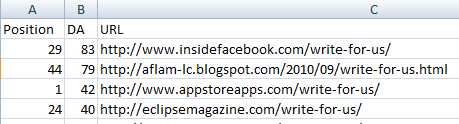
In about one minute, I’m able to build a list like this, sorted by Domain Authority without any need for programming, scrapping, or APIs. Throw this into something like Smart Sheets to collect email addresses, and off you go.
Screaming Frog For Checking Backlinks
I love Screaming Frog for site audits, but it is also really useful for link analysis. The custom filters allow you to check the source code for the presence of various things, one of those things can be link related source code.
So how would you use this?
Let’s say I was the SEO working on this infographic about STDs (I’m not affiliated with it at all, just needed a recent example). I’ve pushed hard for coverage and it has started to be picked up, but some sites posted it to their blog and did not link back to the website. I want a quick way for finding all of these, so I can go and ask them to add a link in a timely manner.
Here is how:
- Search on Google for something like: “Why you’re an STD Risk” infographic
- Filter posts to show only those from the last week
- Use SEOmoz Add-on to export the results (show 100)
- Grab the URLs and save into a text file
- Change Screaming Frog to list mode and open your list of URLs
- Setup a custom filter for Does Not Contain:
href="http://www.healthtestingcenters.com
- Run scan
- Optional step: Do a VLOOKUP on URLs with SEOmoz metrics to sort by DA and filter out low quality scraper sites.
Do this in the days to weeks after an infographic launch to make sure you’re getting the proper citations from people posting your infographic.
Also useful for Gmail is “canned responses”
It let’s you add a heap of templates ready to go, so depending of what sort of link building campaign you’re doing, it can really speed things up (vs notepad copy paste)
Hi Justin,
Now I know, why people call you the “Master of Link Building”. The task of link building is very hectic as you said same repetitive, finding links, contacting etc which I hate most. But if you are into SEO & you don’t do link building then you SUCK at SEO (which I’m right now.) I couldn’t match a step with you in link building.
Those 18 tools are really awesome. Honestly speaking, never heard of any other tools except screaming frog & knowem. You just not only showed the tools but also teach us how to use it to make most of it. Can’t use fakeapp because don’t have Mac. Also, wanted to know all those apps are in firefox or we can find them in chrome too? I mostly use chrome. The resources you provided is a must to go through.
Thanks for writing such an awesome post 🙂
@Stu
Yeah, it pretty much comes down to me being single and living alone without a family yet, and giving up my weekend evenings and nights to teach myself new stuff. It’s certainly hard to keep up with everything. I’m trying to teach myself how to code better, so I can build some API based tools, but I can’t find the time to do it.
Hey Justin,
Simply an awesome post buddy. Thanks for the mention as well.
I shared this with our linking team here, a couple of very cool tools we were not aware of at all.
Cheers,
Dan
Holy exhaustive post. Found some great tools that I hadn’t heard of!
Canned responses in Gmail is awesome for repetitive email replies/queries. Lately I’m also loving the Citation Labs tools for scraping outbound links and contact info
Great post on Tools To Speed Up Link Building. Curious to know what tools you use all the time? Thanks!
ScrapeBox is also an awesome tool if used wisely.
Hey Justin, great post! I’m a huge fan of Boomerang, Rapportive, and Screaming Frog already. There are a few tools on the list I need to check out. Thanks for sharing!
Appreciate you sharing these links Justin. I’m not even sure how I got to your post (might have been through Outspoken Media) but it’s great. I’m sadly going to enjoy testing them all out over the next week or so.
Cheers
Quentin
Really great tools that i have never heard about, Thanks for sharing !
Julien
I must say Justin you have provided very informative post. I only heard of screaming frog as of now. Now, you have added many more to my list. I will surely share this with my team members. Thanks for letting us know about these tools. I am sure usage of these tools will definitely simplify the tedious link building process.
Justin,
I just spent 45 mins on this post, checking out a tool, signing up for tool, return, read more, repeat….. loved it! I’m having a problem with rss and I’d love to follow your posts.
PS
Cyrus is right about you being one of the future -facing seo blogs 2012. thanks again
Justin – you never cease to amaze me. That’s a fantastic list of tools you put together.
I wish I had Big Fish Game’s budget to hire you on our team!
Hope you’re well! Holiday cheers & happy 2012!
Hi Justin,
How do you monitor the status of live/not live links for multiple client websites you have submitted, and ensure they have been listed as promised?
Do you search for the title of the anchor text used in search and then scrap those URL results in screaming frog, filtering the site name?
Appreciate any feedback.
Vahe
Only came across this now, thanks for the share!
ifttt looks like the one that will affect me the most!
Just came on this site and I am thankful that I have passed by this one. I’ll try to research more about the great tools mentioned above. I have used a few of the mentioned tools before, uhm almost a year ago, like scraper and boomerang and they really are a great help.
I only have one question, will tools that speed up link building now, are these still effective now even if Google has already change its algorithm?
I use Boomerang, Rapportive all the time along with some of the others you mentioned. I’ve been trying out YesWare and while it’s useful and nice, it wasn’t as powerful as I was hoping it would be. I’ll have to look into Texter, that sounds like it could be very useful. Great write up yet again, Justin.